Für ein funktionierendes Setup ist zwingend eine DNS Namensauflösung notwendig. Daher tragen wir die Hostnamen mit ihren IP-Adressen in die jeweilige Hostdatei der beiden Server ein.
/etc/hosts
192.168.0.10 master
192.168.0.11 satellite
Installation Master
apt install mariadb-server -yErstellung der Icinga-DB und Icinga-WebDB
mysql
-- Erstellen der Icinga-DB
create database icingadb ;
create user 'icingadb'@'localhost' identified by 'icingadb';
grant all privileges on icingadb.* to 'icingadb'@'localhost';

-- Erstellen der Icinga-WebDB
create database icingaweb2;
create user 'icingaweb2'@'localhost' identified by 'icingaweb2';
grant all privileges on icingaweb2.* to 'icingaweb2'@'localhost';

-- Privilegien neu laden und beenden
flush privileges;
exit;
Repo installieren
apt update
apt -y install apt-transport-https wget gnupg

wget -O - https://packages.icinga.com/icinga.key | gpg --dearmor -o /usr/share/keyrings/icinga-archive-keyring.gpg

DIST=$(awk -F"[)(]+" '/VERSION=/ {print $2}' /etc/os-release); \
 echo "deb [signed-by=/usr/share/keyrings/icinga-archive-keyring.gpg] https://packages.icinga.com/debian icinga-${DIST} main" > \
 /etc/apt/sources.list.d/${DIST}-icinga.list
 echo "deb-src [signed-by=/usr/share/keyrings/icinga-archive-keyring.gpg] https://packages.icinga.com/debian icinga-${DIST} main" >> \
 /etc/apt/sources.list.d/${DIST}-icinga.list

apt update

apt install icinga2 -y
Installation der Standard Plugins
apt install monitoring-plugins -yAktivierung der API und Neustart Icinga2
icinga2 api setup
systemctl restart icinga2
Aufsetzen Icinga-DB
apt install icingadb-redis -y
systemctl enable --now icingadb-redis-server
Aktivieren des Icinga-DB-Features
icinga2 feature enable icingadb
icinga2 feature list
systemctl restart icinga2.service
Installieren des Icinga-DB Daemons
apt install icingadb -yMySQL Schema importieren
mysql -u root icingadb </usr/share/icingadb/schema/mysql/schema.sqlAnpassung der Konfiguration /etc/icingadb/config.yml
database:
  type: mysql
  host: localhost
  database: icingadb
  user: icingadb
  password: xxxxxxxxxxx
redis:
  host: localhost
  port: 6380
logging:
  options:
retention:
  history-days: 180
  sla-days: 180
  options:
Aktivierung und Start des Dienstes
systemctl enable --now icingadb
Installation Icinga2 Web
apt install php-fpm nginx -y
apt install icingadb-web -y
Erstellen einer Nginx Konfigurationsdatei
icingacli setup config webserver nginx --document-root /usr/share/icingaweb2/public > /etc/nginx/conf.d/icinga.confLöschen der Default Konfiguration von Nginx.
rm -rf /etc/nginx/sites-enabled/defaultJetzt muss noch die Datei der Nginx Konfiguration angepasst werden.
server {
  listen *:80 default_server;
  server_name _;

  # nagvis inkl. php
  location /nagvis {
    alias /usr/share/nagvis/share;
    location ~ \.php$ {
      include snippets/fastcgi-php.conf;
      fastcgi_param SCRIPT_FILENAME $request_filename;
      fastcgi_pass unix:/run/php/php-fpm.sock;
    }
  }

  ### INSTALLER START
  location ~ ^/icingaweb2/index\.php(.*)$ {
    #fastcgi_pass 127.0.0.1:9000;
    fastcgi_pass unix:/run/php/php-fpm.sock ;
    fastcgi_index index.php;
    include fastcgi_params;
    fastcgi_param SCRIPT_FILENAME /usr/share/icingaweb2/public/index.php;
    fastcgi_param ICINGAWEB_CONFIGDIR /etc/icingaweb2;
    fastcgi_param REMOTE_USER $remote_user;
  }

  location ~ ^/icingaweb2(.+)? {
    alias /usr/share/icingaweb2/public;
    index index.php;
    try_files $1 $uri $uri/ /icingaweb2/index.php$is_args$args;
  }
  ###INSTALLER END
}
Neustart Nginx
systemctl restart nginxErstellung Setup Token
icingacli setup token create
icingacli setup token show
Dateirechte anlegen
chown www-data /var/log/icingaweb2/
apt install php-imagick -y
Installation GIT Client
apt install git -yDirector Installation - Datenbank anlegen
mysql -e "CREATE DATABASE director CHARACTER SET 'utf8';"
mysql -e "CREATE USER director@localhost IDENTIFIED BY 'director';"
mysql -e "GRANT ALL ON director.* TO director@localhost;"
Installation Icinga2 Web Modul
cd /usr/share/icingaweb2/modules
git clone https://github.com/Icinga/icingaweb2-module-director.git director
icingacli module enable director
Import MySQL Schema
mysql -u director -pdirector director < /usr/share/icingaweb2/modules/director/schema/mysql.sqlDirector User anlegen
useradd -r -g icingaweb2 -d /var/lib/icingadirector -s /bin/false icingadirector
install -d -o icingadirector -g icingaweb2 -m 0750 /var/lib/icingadirector
Service installieren und aktivieren
MODULE_PATH=/usr/share/icingaweb2/modules/director
cp "${MODULE_PATH}/contrib/systemd/icinga-director.service" /etc/systemd/system/
systemctl daemon-reload
systemctl enable --now icinga-director.service
Installation Incubator
MODULE_NAME=incubator
MODULE_VERSION=v0.23.0
REPO="https://github.com/Icinga/icingaweb2-module-${MODULE_NAME}"
MODULES_PATH="/usr/share/icingaweb2/modules"
git clone ${REPO} "${MODULES_PATH}/${MODULE_NAME}" --branch "${MODULE_VERSION}"
icingacli module enable "${MODULE_NAME}"
Neustart Maschine
Beendigung Setup http://IP-Adresse/icingaweb2/
vi /etc/icinga2/zones.conf
/*
 * Generated by Icinga 2 node setup commands
 * on 2025-07-31 07:09:52 +0000
 */

object Endpoint "master" {
}

object Zone "master" {
        endpoints = [ "master" ]
}

object Zone "global-templates" {
        global = true
}

object Zone "director-global" {
        global = true
}

object Endpoint "satellite" {
  host = "192.168.0.11"
}

object Zone "satellite" {
  endpoints = [ "satellite" ]
  parent = "master"
}
Hinterher im Director den Kickstart neu ausführen. Für jeden Satelliten müssen eigene Host- und Service-Templates erstellt werden, in denen als Cluster der jeweilige Satellit angegeben werden muss.
Installation Satellite
apt install mariadb-server -yErstellung der Icinga-DB und Icinga-WebDB
mysql
-- Erstellen der Icinga-DB
create database icingadb ;
create user 'icingadb'@'localhost' identified by 'icingadb';
grant all privileges on icingadb.* to 'icingadb'@'localhost';

-- Erstellen der Icinga-WebDB
create database icingaweb2;
create user 'icingaweb2'@'localhost' identified by 'icingaweb2';
grant all privileges on icingaweb2.* to 'icingaweb2'@'localhost';

-- Privilegien neu laden und beenden
flush privileges;
exit;
Repo installieren
apt update
apt -y install apt-transport-https wget gnupg

wget -O - https://packages.icinga.com/icinga.key | gpg --dearmor -o /usr/share/keyrings/icinga-archive-keyring.gpg

DIST=$(awk -F"[)(]+" '/VERSION=/ {print $2}' /etc/os-release); \
 echo "deb [signed-by=/usr/share/keyrings/icinga-archive-keyring.gpg] https://packages.icinga.com/debian icinga-${DIST} main" > \
 /etc/apt/sources.list.d/${DIST}-icinga.list
 echo "deb-src [signed-by=/usr/share/keyrings/icinga-archive-keyring.gpg] https://packages.icinga.com/debian icinga-${DIST} main" >> \
 /etc/apt/sources.list.d/${DIST}-icinga.list

apt update

apt install icinga2 -y
Installation der Standard Plugins
apt install monitoring-plugins -yAktivierung der API und Neustart Icinga2
icinga2 api setup
systemctl restart icinga2
Aufsetzen Icinga-DB
apt install icingadb-redis -y
systemctl enable --now icingadb-redis-server
Aktivieren des Icinga-DB-Features
icinga2 feature enable icingadb
icinga2 feature list
systemctl restart icinga2.service
Installieren des Icinga-DB Daemons
apt install icingadb -yMySQL Schema importieren
mysql -u root icingadb </usr/share/icingadb/schema/mysql/schema.sqlAnpassung der Konfiguration /etc/icingadb/config.yml
database:
  type: mysql
  host: localhost
  database: icingadb
  user: icingadb
  password: xxxxxxxxxxx
redis:
  host: localhost
  port: 6380
logging:
  options:
retention:
  history-days: 180
  sla-days: 180
  options:
Aktivierung und Start des Dienstes
systemctl enable --now icingadbStart Icinga Node Wizard
icinga2 node wizard

    Common Name (CN): satellite.private.de

    Node Type: Satellite

    Master Endpoint: master.private.de

    API Port: 5665

    Trust Master: Yes

    Accept config: Yes

    Accept commands: Yes
vi /etc/icinga2/zones.conf
/*
 * Generated by Icinga 2 node setup commands
 * on 2025-07-31 09:05:22 +0200
 */

object Endpoint "master" {
        host = "192.168.0.10"
        port = "5665"
}

object Zone "master" {
        endpoints = [ "master" ]
}

object Endpoint "satellite" {
        host = "192.168.0.11"
        port = "5665"
}

object Zone "satellite" {
        endpoints = [ "satellite" ]
        parent = "master"
}

object Zone "global-templates" {
        global = true
}

object Zone "director-global" {
        global = true
}
Installation Agent Host Windows
Download des Pakets auf dem Windows Agent und Installation.
Jetzt auf dem Master das Ticket für den Agent Host erzeugen. Dabei kommt eine wilde Zahlenfolge heraus, die wir dann in den Agent kopieren.
icinga2 pki ticket --cn windowsserver.private
82d32e011eba5a6329966278707b95dbf6cf2314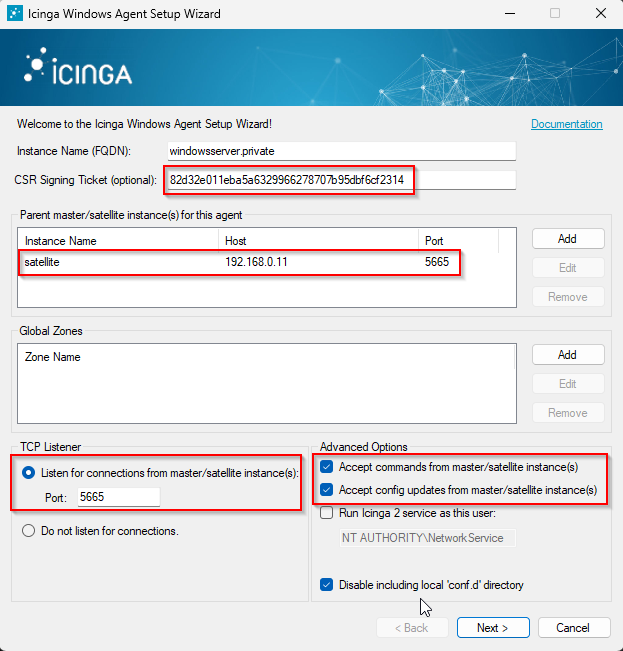
Installation Icinga2 Linux Agent
Installation Redhat Repositories
rpm --import https://packages.icinga.com/icinga.key
dnf install -y http://packages.icinga.com/epel/icinga-rpm-release-8-latest.noarch.rpm
dnf install -y https://dl.fedoraproject.org/pub/epel/epel-release-latest-8.noarch.rpm
dnf makecache
/etc/yum.repos.d/Rocky-PowerTools.repo
[powertools]
name=Rocky Linux $releasever - PowerTools
mirrorlist=https://mirrors.rockylinux.org/mirrorlist?arch=$basearch&repo=PowerTools-$releasever
#baseurl=http://dl.rockylinux.org/$contentdir/$releasever/PowerTools/$basearch/os/
gpgcheck=1
enabled=1
countme=1
gpgkey=file:///etc/pki/rpm-gpg/RPM-GPG-KEY-rockyofficial
Installation Icinga2 und Plugins für RedHat
dnf install -y icinga2 nagios-plugins-*Einrichtung Debian Repositories
apt install -y apt-transport-https
curl https://packages.icinga.com/icinga.key | apt-key add -
echo "deb https://packages.icinga.com/debian icinga-bullseye main" > /etc/apt/sources.list.d/icinga-stable-release.list
apt update
Aktuell müssen wir noch auf einen Trick zurückgreifen, da Icinga2 noch mit Debian12 auf veraltete Bibliotheken angewiesen ist.
apt install -y curl gnupg apt-transport-https lsb-release
curl https://packages.icinga.com/icinga.key | gpg --dearmor | sudo tee /usr/share/keyrings/icinga-archive-keyring.gpg > /dev/null
echo "deb [signed-by=/usr/share/keyrings/icinga-archive-keyring.gpg] https://packages.icinga.com/debian icinga-bookworm main" | sudo tee /etc/apt/sources.list.d/icinga.list
apt update
apt install icinga2 monitoring-plugins monitoring-plugins-contribInstallation Oracle Linux Agent
Die Repositories für Redhat basierte Systeme gibt's bei Icinga2 nur noch gegen Cash. Die Repo für CentOS ist zwar nicht mehr sichtbar, aber tatsächlich noch da. 😉
dnf -y install https://packages.icinga.com/centos/8/release/x86_64/icinga2-bin/icinga2-bin-2.14.3-1.el8.x86_64.rpm
dnf -y install https://packages.icinga.com/centos/8/release/x86_64/icinga2-common/icinga2-common-2.14.3-1.el8.x86_64.rpm
dnf -y install https://packages.icinga.com/centos/8/release/x86_64/icinga2/icinga2-2.14.3-1.el8.x86_64.rpm
dnf -y install nagios-plugins-disk nagios-plugins-load nagios-plugins-uptime nagios-plugins-users nagios-plugins-ssh nagios-plugins-tcp nagios-plugins-time nagios-plugins-procs nagios-plugins-ntp
Start Icinga2 node Wizard
icinga2 node wizardroot@linuxhost:~# icinga2 node wizard
Welcome to the Icinga 2 Setup Wizard!
We will guide you through all required configuration details.
Please specify if this is an agent/satellite setup ('n' installs a master setup) [Y/n]:
Starting the Agent/Satellite setup routine...
Please specify the common name (CN) [linuxhost]:
Please specify the parent endpoint(s) (master or satellite) where this node should connect to:
Master/Satellite Common Name (CN from your master/satellite node): satellite
Do you want to establish a connection to the parent node from this node? [Y/n]:
Please specify the master/satellite connection information:
Master/Satellite endpoint host (IP address or FQDN): 192.168.0.11
Master/Satellite endpoint port [5665]:
Add more master/satellite endpoints? [y/N]:
Parent certificate information:
Version: 3
Subject: CN = satellite
Issuer: CN = Icinga CA
Valid From: Jul 31 07:05:07 2025 GMT
Valid Until: Sep 1 07:05:07 2026 GMT
Serial: 7a:4f:a5:77:33:4b:16:1f:90:57:87:d1:72:8f:3c:fb:8d:3d:a1:ea
Signature Algorithm: sha256WithRSAEncryption
Subject Alt Names: satellite
Fingerprint: A8 7E EB 18 27 30 91 06 60 EC 66 EA C4 7A 3C 7A 02 74 24 FE C4 67 0D EC AD 6A A0 7D 38 77 97 65
Is this information correct? [y/N]: y
Please specify the request ticket generated on your Icinga 2 master (optional).
(Hint: # icinga2 pki ticket --cn 'linuxhost'): 82505284b83481c59159ac3131bc65fec61b1910
Please specify the API bind host/port (optional):
Bind Host []:
Bind Port []:
Accept config from parent node? [y/N]: y
Accept commands from parent node? [y/N]: y
Reconfiguring Icinga...
Disabling feature notification. Make sure to restart Icinga 2 for these changes to take effect.
Enabling feature api. Make sure to restart Icinga 2 for these changes to take effect.
Local zone name [linuxhost]:
Parent zone name [master]:
Default global zones: global-templates director-global
Do you want to specify additional global zones? [y/N]:
Do you want to disable the inclusion of the conf.d directory [Y/n]: Y
Disabling the inclusion of the conf.d directory...
Done.
Now restart your Icinga 2 daemon to finish the installation!
root@linuxhost:~#
systemctl restart icinga2