Linux Agent
RedHat
rpm --import https://packages.icinga.com/icinga.key
dnf install -y http://packages.icinga.com/epel/icinga-rpm-release-8-latest.noarch.rpm
dnf install -y https://dl.fedoraproject.org/pub/epel/epel-release-latest-8.noarch.rpm
dnf makecache
Anpassen der Rocky-PowerTools Repo /etc/yum.repos.d/Rocky-PowerTools.repo
[powertools]
name=Rocky Linux $releasever - PowerTools
mirrorlist=https://mirrors.rockylinux.org/mirrorlist?arch=$basearch&repo=PowerTools-$releasever
#baseurl=http://dl.rockylinux.org/$contentdir/$releasever/PowerTools/$basearch/os/
gpgcheck=1
enabled=1
countme=1
gpgkey=file:///etc/pki/rpm-gpg/RPM-GPG-KEY-rockyofficial
Installation Icinga2 und Plugins
dnf install -y icinga2 nagios-plugins-*Debian
apt install -y apt-transport-https
curl https://packages.icinga.com/icinga.key | apt-key add -
echo "deb https://packages.icinga.com/debian icinga-bullseye main" > /etc/apt/sources.list.d/icinga-stable-release.list
apt update
Oracle Linux Agent
dnf -y install https://packages.icinga.com/centos/8/release/x86_64/icinga2-bin/icinga2-bin-2.14.3-1.el8.x86_64.rpm
dnf -y install https://packages.icinga.com/centos/8/release/x86_64/icinga2-common/icinga2-common-2.14.3-1.el8.x86_64.rpm
dnf -y install https://packages.icinga.com/centos/8/release/x86_64/icinga2/icinga2-2.14.3-1.el8.x86_64.rpm
dnf -y install nagios-plugins-disk nagios-plugins-load nagios-plugins-uptime nagios-plugins-users nagios-plugins-ssh nagios-plugins-tcp nagios-plugins-time nagios-plugins-procs nagios-plugins-ntp
Start Icinga2 node Wizard auf Linux Agent Ausführen
icinga2 node wizard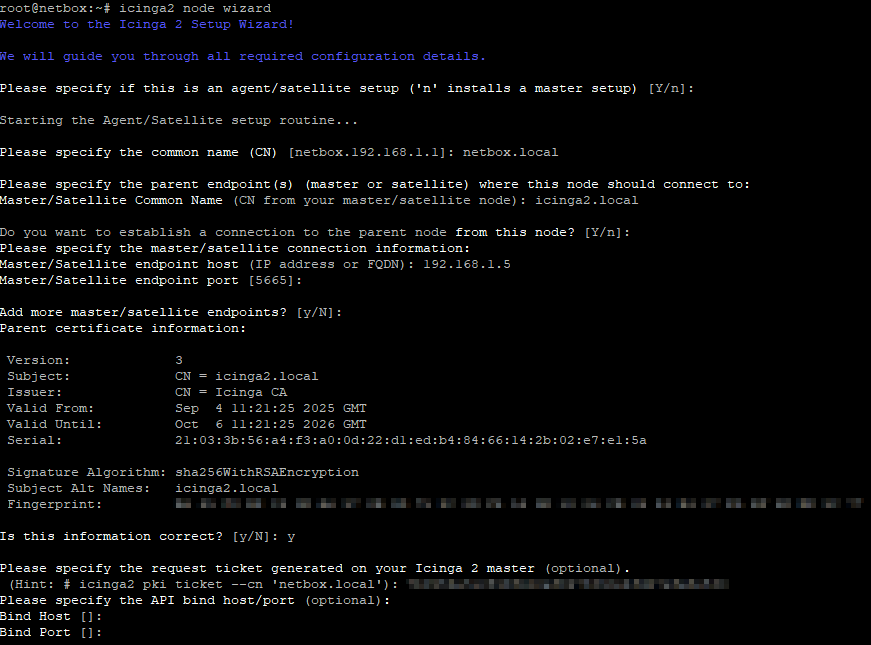
Icinga2 für den automatischen Start konfigurieren und Neustart Icinga2
systemctl enable icinga2
systemctl start icinga2